












National App & Mobile Casino – The Complete Guide for 2026
National Mobile – Your Casino in Your Pocket
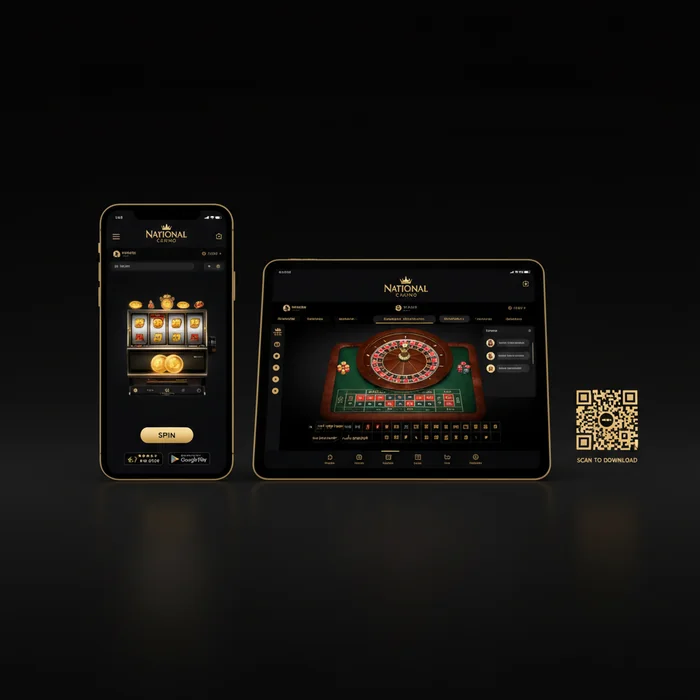
Did you know that VIP players at National complete more than half of their gaming sessions on the go? The National app wasn't built as an afterthought – it was designed from the ground up as a fully-featured experience for players who refuse to compromise. Whether you're quickly checking your loyalty points on your commute or joining an exclusive VIP tournament from your couch in the evening: our mobile offering keeps pace with your lifestyle.
The National mobile platform gives you full access to your account, your bonuses, your loyalty tier, and of course the entire game library – without ever needing to fire up a desktop. New players can register directly from their smartphone, while existing members can sign in through our login portal. Everything you can do on desktop works on mobile too – and some things work even better.
Compatibility & System Requirements
Before you get started, here's a clear overview: our platform runs on virtually every modern device. The table below shows you exactly what you need.
| Platform | Minimum Version | Download | App Size |
|---|---|---|---|
| iOS (iPhone & iPad) | iOS 13.0 or higher | App Store | approx. 85 MB |
| Android | Android 8.0 or higher | Direct APK Download | approx. 72 MB |
| Windows (Desktop/Laptop) | Windows 10 or higher | Browser (no download required) | – |
| Mobile Browser | Current Chrome, Safari, Firefox | No download required | – |
| Tablet (iOS & Android) | Same requirements as smartphone | App Store / APK | approx. 85–90 MB |
iOS Compatibility in Detail
For iPhone users from the XR model onwards, the National iOS app runs exceptionally smoothly. Touch ID and Face ID integration makes logging in possible within seconds – an advantage our VIP members particularly appreciate when they want to switch quickly between sessions.
On iPad, you also benefit from the larger display: live casino tables are displayed optimally in landscape mode, and the VIP dashboard view shows you all the relevant information – points balance, current tier, next reward – at a glance.
Android Compatibility in Detail
Since Google Play Store policies restrict gambling apps in many regions, we provide the National Android app as an APK file directly on our site. The download takes just a few minutes and only requires a one-time adjustment in your device's security settings.
Android users get the exact same full functionality as iOS players – including push notifications for exclusive VIP offers, tournament reminders, and deposit confirmations. No feature gets left behind.
National App Features in Detail
Games on Mobile
The National mobile app game library includes over 3,000 titles – from classic slots to live dealer tables to jackpot games. All games are optimized for touchscreen: swipe gestures replace mouse clicks, controls are larger, and load times have been specifically reduced for mobile connections.
Three titles that work particularly well on smartphone: Book of Dead with its straightforward bet controls, Crazy Time Live with its optimized full-screen mode, and Sweet Bonanza, whose cascading mechanic feels intuitive on a touchscreen. Our VIP players frequently choose mobile specifically for live casino sessions, because the atmosphere is fully preserved even on a smaller screen.
New game titles are regularly added to the mobile portfolio – often simultaneously with the desktop launch. So you won't miss a thing just because you're playing on the go.
Mobile Bonuses
The truth is: there's no difference between mobile and desktop bonuses with us. All offers you see on our bonus page apply in full to the app as well. This includes welcome packages, reload offers, and – most importantly – all VIP-exclusive rewards.
VIP members receive push notifications as soon as a personal offer is unlocked for them. That means you'll see your birthday bonus, your tier upgrade reward, or an invitation to an invite-only tournament right on your lock screen – no more missing out. The National mobile bonus is therefore not just equal to the desktop experience, but in practice even faster to access.
For players who are just getting started: the National sign up process is fully optimized for mobile. Registration takes under three minutes, and the welcome bonus is credited immediately after your first deposit – whether you sign up via app or browser.
Banking on Mobile
Deposits and withdrawals work just as smoothly in the app as on desktop. Supported payment methods include Visa, Mastercard, Skrill, Neteller, Paysafecard, Trustly, and various cryptocurrencies, among others. Deposits are typically processed instantly, while withdrawals are handled after successful verification.
VIP players above certain loyalty tiers benefit from increased weekly withdrawal limits – a tangible financial advantage that makes a real difference to your account. Limits increase with each tier level, and our dedicated personal account manager for VIP members can discuss individual arrangements upon request.
All transactions in the app are secured with SSL encryption. Biometric authentication – fingerprint or facial recognition – is available as an additional layer of security and is something we strongly recommend.
How to Download the National App
iOS Download
- Open the App Store on your iPhone or iPad and search for "National Casino".
- Tap "Get" – the app is free and requires no in-app purchases for core functionality.
- Once downloaded, open the app and log in with your existing credentials or create a new account directly.
- Optionally, enable Face ID or Touch ID for faster login – especially convenient for VIP members who switch between sessions frequently.
Android Download
- Visit the official app page in your mobile browser and tap the "Download APK" button.
- If a security warning appears: go to Settings → Security → Unknown Sources and allow installation from your browser on a one-time basis.
- Open the downloaded APK file from your downloads and follow the installation wizard – the process takes under a minute.
- Launch the app and sign in or register. All your loyalty points, VIP tiers, and bonuses will be immediately visible.
Don't want to download anything? No problem. Our mobile browser client works on any current smartphone without installation. Simply open nationalcasinospins.com in your browser – the site automatically detects your device and delivers the optimized mobile view. All features including the VIP dashboard, live chat, and banking are fully available. Perfect for players who don't want to use up storage space.
Mobile App vs. Desktop – A Direct Comparison
| Feature | Mobile App | Desktop |
|---|---|---|
| Game Selection | Over 3,000 titles, all touch-optimized | Full portfolio, identical number of titles |
| Graphics & Display | Optimized for Retina/AMOLED displays | Maximum resolution on a large monitor |
| Load Speed | Fast on stable Wi-Fi or 4G/5G | Consistently fast on wired connection |
| Push Notifications | Yes – VIP offers directly on your lock screen | Email or browser notifications only |
| Bonuses & VIP Access | Fully identical, all tiers accessible | Fully identical |
| Payment Methods | All methods available incl. Apple Pay | All methods available |
| Live Chat Support | Yes – VIP members with prioritized channel | Yes – identical access |
In short: if you value flexibility and instant access to VIP notifications, the app is your best bet. If you're planning extended live casino sessions or prefer large-format game graphics, desktop serves you well. The good news: you don't have to choose – your account, your points, and your bonuses are identical across both.
Performance & Technical Details
Load Times and Data Usage
The National mobile app is optimized for minimal data consumption. Slot games typically load in under three seconds on a stable 4G connection. Live casino streams use more data – we recommend a Wi-Fi connection for longer live sessions to ensure uninterrupted streaming.
Offline functionality is naturally limited: since this is a real-money casino, an active internet connection is required for all gaming sessions. However, the VIP dashboard, your account balance, and your loyalty overview can be retrieved quickly even on a weaker signal, as this data is cached locally.
Battery and Push Notifications
Our app was built with battery efficiency in mind. It uses minimal resources in the background – push notifications are only sent when you've enabled them, and can be configured granularly: for example, you can activate only VIP offers and tournament invitations while disabling general promotional messages.
For longer sessions, we recommend disabling your operating system's battery saver mode, as this can occasionally restrict background processes in the app. For live casino games, reducing screen brightness is also worthwhile – it saves battery without affecting the gaming experience.
Our performance recommendation: For the best mobile experience – especially during live dealer games and VIP tournaments – use a stable Wi-Fi connection, keep the app updated to the latest version, and enable push notifications for your VIP channel. This way you won't miss any time-sensitive offers and you'll be playing at the highest technical level.
Conclusion – Go Mobile with National Now
We opened this guide by noting that VIP players complete a large portion of their sessions on mobile – and that's no coincidence. The National app is built to meet the standards of genuine high-value players: full loyalty access, prioritized support, instant bonus notifications, and a game library with no compromises. This isn't a watered-down product – it's our complete casino, made mobile.
Not a member yet? Get started now: Register at National and dive straight into mobile play. Existing players can download the app or simply open their browser – your VIP status, your points, and your bonuses are already waiting for you. Whether it's smartphone or tablet, iOS or Android: National is wherever you want to play.